Search Focus Are A SEO Company That Can Increase Your Online Sales Revenue Through Driving Qualified Targeted Visitors To Your Website
How to Track AI Referral Traffic in GA4: ChatGPT, Claude, Gemini and Perplexity
AI-generated answers are becoming another route through which people discover websites, research suppliers and compare products.
For SEO professionals, the difficult part is no longer recognising that AI platforms can send traffic. The real challenge is measuring that traffic accurately enough to understand which platforms are sending visitors, which pages they recommend and whether those sessions produce meaningful business results.
Industry reporting suggests that measurable AI referral traffic remains relatively small compared with traditional organic search, but it is becoming more diverse as platforms such as ChatGPT, Claude, Gemini and Perplexity develop their search and citation features.
I would not treat AI referral traffic as a replacement for organic search traffic. I treat it as an additional acquisition channel that needs its own reporting structure.
Without that structure, visits from AI assistants can become mixed into:
- Referral
- Organic Search
- Direct
- Unassigned
- A Platform-Specific Source
- A UTM-Tagged Campaign
That makes it difficult to answer even basic questions.
Which AI platform referred the visitor? Which page was recommended? What did the visitor do after arriving? Did the session produce an enquiry, purchase or other key event?
The following process is how I would set up AI referral tracking in Google Analytics 4.
What Counts as AI Referral Traffic?
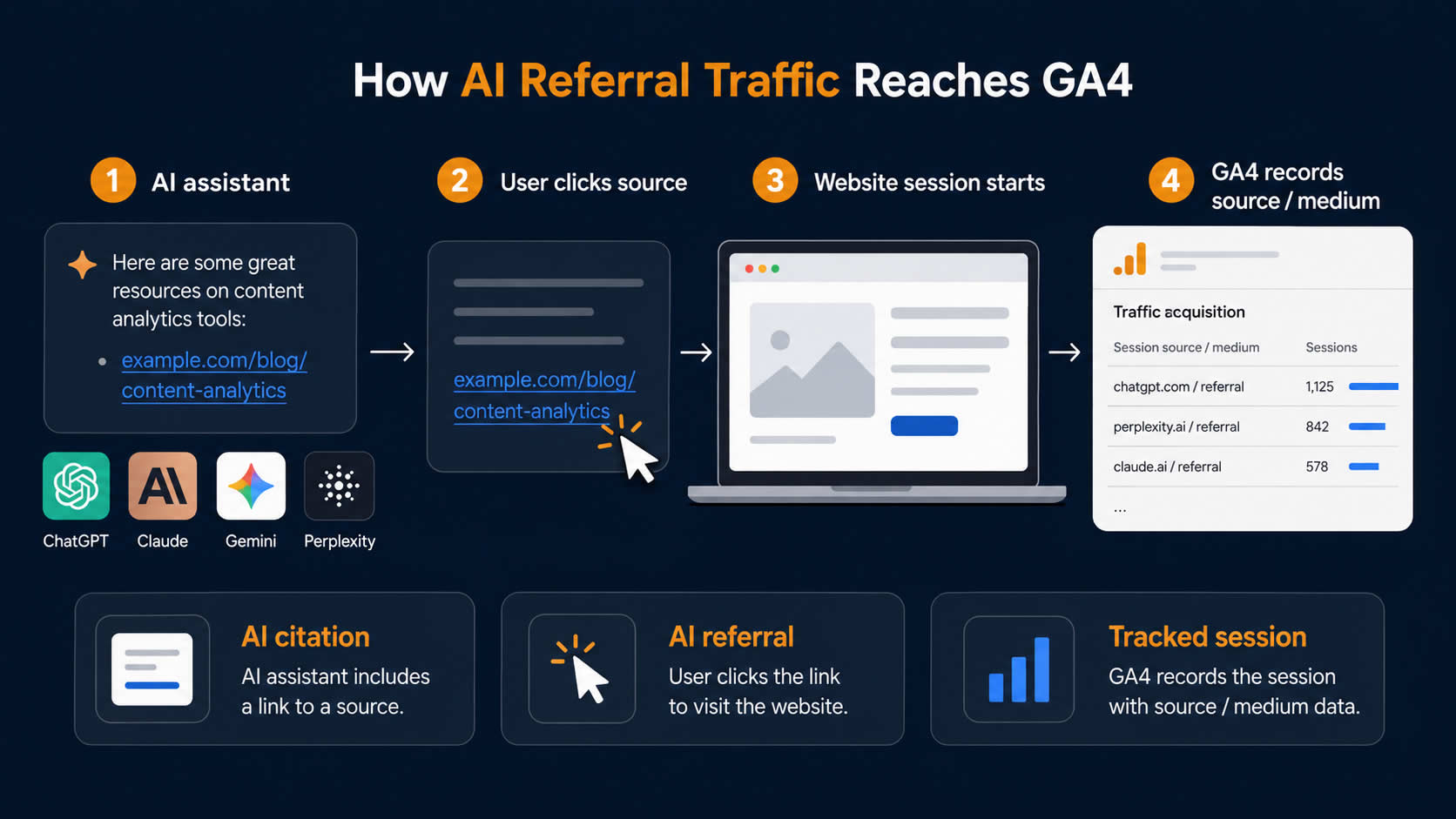
AI referral traffic is a website session that begins after somebody clicks a link presented by an AI assistant, answer engine or AI-powered search experience.
That may include links from:
- ChatGPT
- Claude
- Gemini
- Perplexity
- Microsoft Copilot
- Poe
- You.com
- Phind
- Other AI Search or Assistant Platforms
The visitor may have reached the link through a citation, a source panel, an inline recommendation or a brand link included within the generated answer.
It is important to separate this from other forms of AI visibility.
| Measurement | What It Shows |
|---|---|
| AI Mention | The brand or website appeared in an AI-generated answer |
| AI Citation | A page was shown as a supporting source |
| AI Referral | A user clicked from the AI platform to the website |
| AI-Assisted Conversion | The AI interaction contributed to a later conversion |
| AI Crawler Visit | A bot requested a page from the website |
An AI crawler visit is not referral traffic. It is a request made by an automated crawler rather than a human visitor.
Likewise, a citation does not necessarily produce a click. An AI answer may use information from a website without sending any measurable website traffic.
I therefore measure AI visibility and AI referral traffic separately.
Why AI Referral Tracking Is More Complicated Than It Looks
At first, it seems as though AI referrals should simply appear in GA4 as ordinary referral traffic.
Sometimes they do.
However, attribution depends on what information reaches Google Analytics when the session begins.
GA4 can use campaign parameters such as utm_source, or it can use the document referrer supplied by the browser. When neither is available, the session may be classified as Direct.
The same AI platform may therefore appear in different ways.
For example, a ChatGPT visit might be recorded using:
chatgpt.com / referral
It could also be recorded using a UTM source because OpenAI automatically includes:
utm_source=chatgpt.com
in referral URLs from ChatGPT search results.
Other visits may arrive without a usable referrer and appear as:
(direct) / (none)
That does not mean every unexplained Direct visit came from an AI platform. It means that some AI visits may be impossible to identify using ordinary session-level analytics.
This is why I see GA4 data as a measurable minimum rather than a perfect count of every AI-influenced visit.
Use Session-Scoped Data, Not Only First-User Data
The first decision is which acquisition scope to use.
GA4 separates traffic-source dimensions into different scopes.
First-User Dimensions
These show how a person originally discovered the website.
A visitor who first found the site through Google and later returned through ChatGPT may still have Google recorded as their first-user source.
Session Dimensions
These show how each individual session began.
For AI referral tracking, I normally begin with session-scoped dimensions because I want to know which platform sent the current visit.
Google places session-scoped dimensions in the Traffic acquisition report. First-user dimensions are used in the User acquisition report.
The dimensions I use most frequently are:
- Session Source
- Session Medium
- Session Source/Medium
- Session Default Channel Group
- Session Campaign
- Landing Page + Query String
- Page Referrer
The Traffic acquisition report is therefore a better starting point than the User acquisition report when the goal is to measure individual AI-referred sessions.
Begin With a Manual Audit of Existing Sources
Before creating filters or custom channels, I check what GA4 is already recording.
Go to:
Reports → Acquisition → Traffic acquisition
Change the main dimension to:
Session source / medium
The Traffic acquisition report is designed to show where new and returning sessions originated, and the search field above the report can be used to isolate individual sources.
Search separately for terms such as:
chatgpt
openai
perplexity
claude
anthropic
gemini
copilot
poe
phind
you.com
I do this before applying a broad regular expression because each GA4 property can contain slightly different source values.
The audit may reveal values such as:
chatgpt.com / referral
perplexity.ai / referral
claude.ai / referral
gemini.google.com / referral
It may also reveal unexpected source names, redirect domains or campaign values.
Record everything relevant before creating the final grouping.
Check the Page Referrer as Well
The Session source dimension is useful for reporting, but the Page referrer dimension can provide more detail.
GA4 defines Page referrer as the previous URL recorded when the visitor reached the current page. It can contain either an internal URL or a URL from another domain.
Create an Exploration using:
- Page Referrer
- Session Source
- Session Medium
- Landing Page + Query String
- Sessions
- Engaged Sessions
- Key Events
This can help identify referral patterns that are not obvious in the standard acquisition report.
Be careful when interpreting Page referrer.
The dimension can include internal referrers as the visitor moves around the site. It should therefore be analysed alongside landing-page and session-source data rather than used on its own.
Build an AI Referral Exploration in GA4
I prefer to create a Free-form Exploration before changing the property’s channel grouping.
This gives me a flexible working report where I can test filters, compare metrics and identify missed source values.
Google’s Free-form Exploration supports multiple dimensions, metrics, segments and filters in the same analysis.
Go to:
Explore → Free form
Add the following dimensions.
Dimensions
- Session Source
- Session Medium
- Session Source/Medium
- Landing Page + Query String
- Page Title
- Page Referrer
- Device Category
- Country
- New/Established
- Date
Add the following metrics.
Metrics
- Sessions
- Total Users
- New Users
- Engaged Sessions
- Engagement Rate
- Average Engagement Time per Session
- Views per Session
- Key Events
- Session Key Event Rate
- Total Revenue
Place Session source / medium in the rows.
Add the main engagement and key-event metrics as values.
Then apply a filter to Session source using a regular expression.
A useful starting expression is:
.*chatgpt.*|.*openai.*|.*perplexity.*|.*claude.*|.*anthropic.*|.*gemini.*|.*copilot.*|.*poe.*|.*you\.com.*|.*phind.*
This should be treated as a starting point rather than a permanent universal list.
AI platforms change domains, redirect behaviour and tracking parameters. New platforms also appear regularly.
I would review the underlying Referral and Direct data periodically and update the expression when new source values become visible.
Create an AI Assistants Custom Channel Group
Once I know which source values are present, I create a dedicated channel group.
Google now includes AI assistants as an official example within its GA4 custom channel-group guidance. The example recommends creating an AI Assistants channel, matching relevant source values with a regular expression and placing the new channel above Referral so matching traffic is classified correctly.
Go to:
Admin → Data display → Channel groups
Select:
Create new channel group
GA4 will create a copy of the default channel group that you can edit.
Add a new channel named:
AI Assistants
Create a condition based on:
Source → Matches regex
You could use:
.*chatgpt.*|.*openai.*|.*perplexity.*|.*claude.*|.*anthropic.*|.*gemini.*|.*copilot.*|.*poe.*|.*you\.com.*|.*phind.*
Move the AI Assistants channel above Referral.
This order matters because GA4 assigns traffic to the first matching channel in the list.
Google’s own example uses a broader regular expression containing terms such as ai, google, bard, gpt and copilot.
I normally prefer to begin with a narrower expression based on the source values found in the property. A term as broad as ai can potentially match unrelated sources, while adding generic terms such as google could absorb traffic that does not belong in the AI channel.
The aim is not to create the longest possible list. It is to create a list that classifies the property’s actual traffic accurately.
Should AI Assistants Become the Primary Channel Group?
GA4 allows a custom channel group to become the property’s primary channel group.
I would not make that change immediately.
I prefer to leave the default channel structure intact while testing the new AI grouping as a separate dimension.
This makes it easier to:
- Compare the New Group With Default Reporting
- Check Whether Organic or Referral Traffic Has Been Misclassified
- Identify Overly Broad Regex Conditions
- Validate Historical Data
- Make Changes Without Disrupting Regular Reports
Custom channel groups can be applied retrospectively within supported GA4 reports and explorations. However, if one is selected as the property’s primary channel group, changes to that primary definition affect future reporting from that point onwards.
I would only promote the custom group after it has been tested across a meaningful date range.
Track the Landing Pages AI Platforms Recommend
A total session count is not enough.
The more useful question is which pages AI platforms are sending visitors to.
Add:
Landing page + query string
below Session source in the Exploration.
This creates a nested report showing:
AI Platform
    → Landing Page
Look for patterns.
Are AI assistants sending traffic to:
- Blog Posts
- Technical Guides
- Comparison Pages
- Product Pages
- Service Pages
- Pricing Pages
- Homepages
- Documentation
- Case Studies
- Calculator Pages
AI assistants may favour pages that answer a specific question clearly rather than pages that target broad commercial keywords.
That makes the landing-page report useful for content planning.
For each landing page, I review:
- The Question the Page Answers
- Whether the Visit Was Branded or Non-Branded
- The Page’s Commercial Relevance
- Engagement Rate
- Average Engagement Time
- Key Events
- Assisted Enquiries or Sales
- Whether Similar Content Could Be Created
A page receiving ten high-quality AI referrals may be more valuable than one receiving a hundred visits that leave without taking action.
Compare AI Traffic With Organic Search Carefully
It is tempting to create a table that compares AI Assistants with Organic Search and declare one channel better than the other.
That can be misleading.
AI referral traffic and organic traffic may represent different user intentions.
A Google organic session might begin with an early informational query. An AI referral may arrive after the user has already asked several follow-up questions, compared alternatives and narrowed down the available options.
The AI-referred visitor may therefore be further through the decision-making process.
However, this should be demonstrated with first-party data rather than assumed.
I compare:
| Metric | What It Helps Me Understand |
|---|---|
| Sessions | Measurable traffic volume |
| Engagement Rate | Whether visitors interact with the site |
| Average Engagement Time | How long they actively use the site |
| Views per Session | Whether they explore beyond the landing page |
| Key Events | Whether they complete valuable actions |
| Session Key Event Rate | How frequently sessions produce an outcome |
| Revenue | Directly attributed ecommerce value |
| Landing Page | Which content earned the referral |
| Returning Users | Whether AI introduced or re-engaged the visitor |
I also compare similar page types.
Comparing AI traffic to a technical guide against all organic traffic across the entire site can produce a distorted result.
A more useful comparison might be:
AI traffic to informational blog posts
versus
Organic traffic to informational blog posts
or:
AI traffic to service pages
versus
Organic traffic to service pages
Make Sure the Right Key Events Are Being Measured
An AI referral report is only as useful as the events attached to it.
GA4 uses key events to identify actions that are important to the organisation. Any collected event can be marked as a key event and then analysed within reports and explorations.
For a lead-generation website, I would consider tracking:
- Contact Form Submissions
- Telephone Number Clicks
- Email Link Clicks
- Quote Requests
- Booking Requests
- Live-Chat Starts
- Downloaded Documents
- Account Registrations
For ecommerce, I would include:
- Add to Cart
- Begin Checkout
- Purchase
- Revenue
- Average Order Value
Avoid relying only on automatic events such as scroll depth.
A visitor who scrolls through an article may be engaged, but that does not necessarily represent a commercially meaningful outcome.
I separate engagement indicators from business outcomes.
Engagement Indicators
- Engaged Session
- Scroll
- Video Start
- Multiple Page Views
- Time on Page
Business Outcomes
- Lead Generated
- Quote Requested
- Purchase Completed
- Call Started
- Booking Confirmed
- Account Created
This distinction makes it easier to assess whether AI referrals are merely interested or genuinely valuable.
Track Telephone and Form Leads Properly
Many SEO reports stop at sessions and engagement because lead tracking is incomplete.
That can undervalue AI referrals, especially when visitors reach a commercial page and telephone the business.
For lead-generation websites, I normally want separate events for:
phone_click
form_submit
email_click
quote_request
booking_complete
Each important event can then be marked as a key event.
Where a website displays multiple telephone numbers, I also prefer to distinguish them using parameters such as:
phone_number
page_location
page_type
service
location
This can show whether an AI-referred visitor called from a service page, location page or blog post.
The same principle applies to forms.
A general newsletter signup should not be given the same value as a qualified quotation request.
Measure Platform Performance Separately
Do not report every AI referral as one combined total and stop there.
Create a platform-level view.
| Platform | Sessions | Engagement Rate | Key Events | Session Key Event Rate | Revenue |
|---|---|---|---|---|---|
| ChatGPT | |||||
| Claude | |||||
| Gemini | |||||
| Perplexity | |||||
| Copilot | |||||
| Other AI Assistants |
The volumes may initially be too small for strong conclusions.
That is normal.
I would avoid making strategic decisions based on only a handful of sessions. Instead, I would watch for patterns over several months.
Useful patterns include:
- One Platform Repeatedly Recommending the Same Guide
- A Platform Sending Traffic to Commercial Pages
- Higher Lead Rates From Certain Assistants
- Differences Between Desktop and Mobile Users
- Changes Following Content Updates
- Sudden Growth in a New Referring Domain
The report becomes more valuable as data accumulates.
Monitor Trends Instead of Looking Only at Totals
AI referral traffic is changing quickly, so I prefer a time-series report.
Create a second tab in the Exploration using:
- Date as the Horizontal Axis
- Sessions as the Metric
- Session Source as the Breakdown
- AI Referral Filter Applied
Use weekly or monthly granularity when the volume is low.
Daily data can create an exaggerated impression because a small number of sessions produces sharp rises and falls.
The trend report helps answer:
- Is AI Referral Traffic Increasing?
- Did a Particular Platform Start Sending Traffic?
- Did Traffic Change After a Content Update?
- Did a New Article Earn AI Referrals?
- Did a Platform Stop Referring Visitors?
- Was a Sudden Increase Driven by One Landing Page?
Add annotations outside GA4 or maintain a simple reporting log for important changes, such as:
- Major Content Updates
- Technical SEO Changes
- Robots.txt Changes
- New Structured Data
- Site Migrations
- Changes to AI Crawler Access
- Important Media Coverage
This provides context when referral traffic changes.
Understand the Direct-Traffic Blind Spot
One of the biggest limitations is that not every AI-originated click will arrive with usable attribution.
GA4 classifies sessions as (direct) / (none) when it does not have clear referral or campaign information. Missing UTM parameters, redirects, URL shorteners, browser behaviour and tracking restrictions can all contribute to lost source information.
This means the visible AI Assistants channel may undercount actual AI influence.
However, I would not create a rule that reclassifies unexplained Direct traffic as AI traffic.
That would replace missing data with speculation.
Instead, I use supporting indicators.
These may include:
- Direct Visits to Deep, Unmemorable URLs
- Sudden Direct Traffic to an Older Guide
- Direct Sessions Landing on Pages Frequently Cited by AI
- Branded Search Increases After AI Mentions
- Customers Stating They Found the Business Through ChatGPT
- CRM Notes Mentioning an AI Assistant
- Form Fields Asking How the Visitor Found the Website
A simple lead-form field can be useful:
How did you hear about us?
Possible answers could include:
- ChatGPT or Another AI Assistant
- Social Media
- Recommendation
- Existing Customer
- Other
Self-reported attribution will not be perfect, but it can identify AI influence that browser-based attribution misses.
Do Not Confuse Crawler Traffic With Human Referral Traffic
Server logs may show requests from AI crawlers such as OAI-SearchBot, GPTBot or other automated user agents.
These requests indicate that a platform has accessed the website.
They do not prove that a human clicked through from an AI response.
Keep separate reports for:
| Data Source | What It Measures |
|---|---|
| GA4 | Human website sessions and on-site actions |
| Server Logs | Crawler and user-agent requests |
| AI Visibility Tools | Mentions, citations and answer presence |
| CRM | Leads, sales and reported acquisition source |
| Search Console | Google organic impressions and clicks |
Bringing these datasets together can produce a fuller picture, but they should not be merged into a single traffic total.
Use BigQuery for More Detailed AI Referral Analysis
For larger websites, I would use the GA4 BigQuery export once the standard reports become restrictive.
BigQuery provides raw event-level data. Google documents separate user-, session- and event-scoped traffic attribution fields. For session analysis, the relevant record is session_traffic_source_last_click, including fields for campaign source and medium.
A basic query could look like this:
WITH event_data AS (
  SELECT
    PARSE_DATE('%Y%m%d', event_date) AS event_date,
    user_pseudo_id,
    (
      SELECT value.int_value
      FROM UNNEST(event_params)
      WHERE key = 'ga_session_id'
    ) AS session_id,
    session_traffic_source_last_click.manual_campaign.source AS source,
    session_traffic_source_last_click.manual_campaign.medium AS medium,
    event_name,
    ecommerce.purchase_revenue AS purchase_revenue
  FROM
    `project_id.analytics_property_id.events_*`
  WHERE
    _TABLE_SUFFIX BETWEEN '20260701' AND '20260731'
)

SELECT
  source,
  medium,
  COUNT(
    DISTINCT CONCAT(
      user_pseudo_id,
      '-',
      CAST(session_id AS STRING)
    )
  ) AS sessions,
  COUNTIF(event_name = 'generate_lead') AS leads,
  COUNTIF(event_name = 'purchase') AS purchases,
  SUM(IFNULL(purchase_revenue, 0)) AS revenue
FROM
  event_data
WHERE
  REGEXP_CONTAINS(
    LOWER(COALESCE(source, '')),
    r'chatgpt|openai|perplexity|claude|anthropic|gemini|copilot|poe|you\.com|phind'
  )
GROUP BY
  source,
  medium
ORDER BY
  sessions DESC;
Replace the project, dataset and date values before using it.
The query can then be expanded to include:
- Landing Page
- Country
- Device
- Content Group
- Lead Type
- Service
- Revenue
- Returning Users
- Assisted Journeys
One limitation is that GA4 custom channel groups are not included as ready-made fields in the BigQuery export. The classification logic must be recreated in SQL.
Keep the regular expression in one reusable SQL function or mapping table rather than copying it into every query.
Create a Simple AI Referral Dashboard
A useful monthly dashboard does not need dozens of charts.
I would include:
Overview
- AI Referral Sessions
- AI Referral Users
- Share of Total Website Sessions
- Key Events
- Session Key Event Rate
- Revenue
Platform Performance
- Sessions by AI Platform
- Key Events by AI Platform
- Revenue by AI Platform
- Engagement Rate by AI Platform
Content Performance
- Top AI Landing Pages
- Landing-Page Key Events
- Page Type
- Content Category
- New Versus Returning Users
Trend
- AI Sessions by Month
- AI Key Events by Month
- New Referring Platforms
- Change Against the Previous Period
Data Quality
- Unassigned Traffic
- Direct Traffic
- New Referral Sources
- Sources Requiring Classification
- Unexpected Channel Changes
This is enough to show whether the channel is growing and whether it is producing value.
Review the Source List Every Month
An AI referral channel should not be configured once and forgotten.
Google’s own guidance recommends updating the regular expression as assistant URLs and the list of platforms change.
Each month, I would check:
Reports → Acquisition → Traffic acquisition
Filter for:
Session medium exactly matches referral
Then look for new or unfamiliar source domains.
Also review:
- Unassigned Traffic
- Direct Landing Pages
- Page Referrer Values
- Campaign Sources
- Sudden Referral Spikes
- New Redirect Domains
Add confirmed AI sources to the channel definition.
Do not add a domain purely because its name contains “AI”. Verify what the site is and whether it genuinely represents an assistant or AI-powered search platform.
What AI Referral Data Can Tell an SEO Professional
Once tracking is reliable, the data becomes more useful than a simple channel report.
It can influence:
- Content Strategy
- Digital PR
- Internal Linking
- Landing-Page Optimisation
- Conversion Tracking
- Entity and Brand Development
- Technical Accessibility
- Reporting Priorities
For example, repeated referrals to a particular guide may indicate that the page answers a question in a format AI systems can retrieve and cite easily.
That does not mean the article should be copied across the site.
Instead, I would analyse why it works.
Does it contain:
- A Clear Answer Near the Beginning
- Specific Facts and Figures
- Comparison Tables
- Concise Definitions
- Useful Examples
- Strong Supporting Sources
- Clear Section Headings
- Original Experience
- A Logical Page Structure
- Relevant Internal Links
That analysis can inform future content without turning the entire strategy into formulaic AI optimisation.
Measure Business Value, Not Just Novelty
AI referral traffic is interesting because it is new.
That does not automatically make it valuable.
The correct question is not:
How many visits did ChatGPT send?
The more useful questions are:
- Which Pages Earned Those Visits?
- What Did the Visitors Do?
- Did They Become Leads or Customers?
- Which Platforms Sent the Best Sessions?
- Is the Channel Growing?
- Is AI Visibility Supporting Branded Search?
- Which Content Deserves Further Investment?
The answer may differ by site.
For one business, AI referrals may generate qualified enquiries. For another, they may produce a small amount of informational traffic with little commercial impact.
Both findings are useful.
The purpose of tracking is not to prove that AI traffic is important. It is to establish whether it is important for the website being measured.
Build AI Referrals Into Regular SEO Reporting
I would now include AI referral traffic as a small but separate part of a monthly SEO report.
The section should show:
- Total AI Referral Sessions
- Month-on-Month Change
- Leading AI Platforms
- Top Landing Pages
- Key Events
- Session Key Event Rate
- Revenue or Lead Value
- New Sources Identified
- Tracking Limitations
Avoid presenting the data without context.
If AI traffic increased from five sessions to ten, that is a 100% rise, but the absolute volume remains small.
Show both the percentage change and the actual numbers.
I would also distinguish between:
- Measured AI Referrals
- AI Citations or Mentions
- Suspected Unattributed AI Influence
Only the first category should be reported as confirmed referral traffic.
A Practical AI Referral Tracking Process
My complete process can be summarised as follows:
- Review Session Source/Medium in Traffic Acquisition.
- Record Existing AI-Related Source Values.
- Inspect Page Referrer and Landing-Page Data.
- Build a Free-Form AI Referral Exploration.
- Test a Narrow Source Regex.
- Create an AI Assistants Custom Channel.
- Position It Above Referral.
- Validate That Organic and Referral Data Remain Accurate.
- Track Landing Pages, Engagement and Key Events.
- Compare Platforms Separately.
- Review Direct and Unassigned Traffic Without Reclassifying It Speculatively.
- Add CRM or Self-Reported Attribution.
- Recreate the Classification in BigQuery When Needed.
- Review the Source List Every Month.
- Report Confirmed Traffic Separately From AI Visibility.
AI referral measurement will remain imperfect because analytics can only report the source information it receives.
However, an imperfect but clearly defined reporting framework is far more useful than leaving AI visits scattered across Referral, Direct and Unassigned traffic.
By creating a dedicated channel, validating source values and connecting the sessions to landing pages and key events, I can move the discussion away from novelty and towards measurable SEO value.